Sunday, December 27, 2009
ColorPro 2.0 Released
ColorPro 2.0 has been released. To update to this new version you will have to quit ColorPro 1.0 if it's running then download and install ColorPro 2.0.
Here are the new functionalities and improvements added in version 2.0.
1. Color Chip shapes can now be set to:
- rectangles
- ellipse
- rhombus
- honeycomb1
- honeycomb2
2. Color Pickers show now extra color spaces:
- RGB
- HSV
- CMYK
- HSL
- YUV
3. Color complement selection (based on Hue). Selection of complements is available from a "star" like figure.
4. Color Chip/Palette wide color value modification by applying addition or substraction of:
- RGB sliders (add/substract individual R, G, B channels or all R, G, B channels at once)
- CMYK sliders (add/substract individual C, M, Y, K channels or all C, M, Y, K channels at once)
- HSV sliders (add/substract individual H, S, L channels or all H, S, L channels at once)
5. Color Chip/Palette wide color value modification by applying filters :
- INVERSE, GRAYSCALE, SEPIA, BLACKANDWHITE, GRAYANDWHITE
- NOHUE, NO, NOVAL, FULLHUE, FULLSAT, FULLVAL, HALFHUE, HALFSAT, HALFVAL, DOUBLEHUE, DOUBLESAT, DOUBLEVAL
- Same filters as above for R, G, B and C, M, Y, K channels
6. Searching palette is now possible in the 'Palettes' tab. Search is done by Name, description, number of chips, palette type, user color name of the chip, user color description of the color chip and user color key of the color chip.
7. Exporting palettes is now available also in the following formats:
- Image (BMP, GIF, JPG, PNG, TIFF)
- HTML
- CSS
8. ColorPro can now export and import ColorPic palettes
9. ColorPro can select any color (right click or left click -so when you click on a button you don't activate that button's action) from anywhere on the screen directly into the current palette from the Edit Palette section (using the Magnifier Tool). Be sure to have the Magnifier window "Pick" check box checked before starting to select colors. Checking the 'Select Frenzy' checkbox and having the magnifier opened you could send ColorPro to tray and start picking colors from anywhere on the screen by clicking the left mouse button. The current color (under the mouse cursor) will be visible in the magnifier window.
10. You can now select a portion of the screen (left click, drag and release) and get it's color palette: Go New Tab as SELECT IMAGE
11. Added 'Magnifier Hi-Lite Checked' and "Magnifier Hi-Lite Color" settings
12. Retrieve the image from Clipboard and get it's palette: Go New Tab as CLIPBOARD IMAGE
13. System palettes are not loaded at startup: you can refresh the 'System Palettes' list or recreate them again.
14. Added new default (system) palettes. Here are all system palettes:
- All Named Colors
- Web Safe Colors
- Basic Colors
- Red Web Safe
- Blue Web Safe
- Green Web Safe
- Yellow Web Safe
- Cyan Web Safe
- Magenta Web Safe
- Grayscale
Here are the new functionalities and improvements added in version 2.0.
1. Color Chip shapes can now be set to:
- rectangles
- ellipse
- rhombus
- honeycomb1
- honeycomb2
2. Color Pickers show now extra color spaces:
- RGB
- HSV
- CMYK
- HSL
- YUV
3. Color complement selection (based on Hue). Selection of complements is available from a "star" like figure.
4. Color Chip/Palette wide color value modification by applying addition or substraction of:
- RGB sliders (add/substract individual R, G, B channels or all R, G, B channels at once)
- CMYK sliders (add/substract individual C, M, Y, K channels or all C, M, Y, K channels at once)
- HSV sliders (add/substract individual H, S, L channels or all H, S, L channels at once)
5. Color Chip/Palette wide color value modification by applying filters :
- INVERSE, GRAYSCALE, SEPIA, BLACKANDWHITE, GRAYANDWHITE
- NOHUE, NO, NOVAL, FULLHUE, FULLSAT, FULLVAL, HALFHUE, HALFSAT, HALFVAL, DOUBLEHUE, DOUBLESAT, DOUBLEVAL
- Same filters as above for R, G, B and C, M, Y, K channels
6. Searching palette is now possible in the 'Palettes' tab. Search is done by Name, description, number of chips, palette type, user color name of the chip, user color description of the color chip and user color key of the color chip.
7. Exporting palettes is now available also in the following formats:
- Image (BMP, GIF, JPG, PNG, TIFF)
- HTML
- CSS
8. ColorPro can now export and import ColorPic palettes
9. ColorPro can select any color (right click or left click -so when you click on a button you don't activate that button's action) from anywhere on the screen directly into the current palette from the Edit Palette section (using the Magnifier Tool). Be sure to have the Magnifier window "Pick" check box checked before starting to select colors. Checking the 'Select Frenzy' checkbox and having the magnifier opened you could send ColorPro to tray and start picking colors from anywhere on the screen by clicking the left mouse button. The current color (under the mouse cursor) will be visible in the magnifier window.
10. You can now select a portion of the screen (left click, drag and release) and get it's color palette: Go New Tab as SELECT IMAGE
11. Added 'Magnifier Hi-Lite Checked' and "Magnifier Hi-Lite Color" settings
12. Retrieve the image from Clipboard and get it's palette: Go New Tab as CLIPBOARD IMAGE
13. System palettes are not loaded at startup: you can refresh the 'System Palettes' list or recreate them again.
14. Added new default (system) palettes. Here are all system palettes:
- All Named Colors
- Web Safe Colors
- Basic Colors
- Red Web Safe
- Blue Web Safe
- Green Web Safe
- Yellow Web Safe
- Cyan Web Safe
- Magenta Web Safe
- Grayscale

Sunday, December 20, 2009
Iconico.com Christmas and New Year's 40% Off
Iconico.com is planning a 40% off on almost all Iconico software products.
You can get huge savings on software like Screen Calipers, Data Extractor and Clipstory.
To get the discount simply enter the coupon code 200940OFF during the checkout process.
This promotion will last from 23 December 2009 until 3rd of January 2010, so hurry now as we won't be repeating it any time soon!

You can get huge savings on software like Screen Calipers, Data Extractor and Clipstory.
To get the discount simply enter the coupon code 200940OFF during the checkout process.
This promotion will last from 23 December 2009 until 3rd of January 2010, so hurry now as we won't be repeating it any time soon!
Tuesday, November 24, 2009
Sleepy No Longer Hosted on Iconico.com
As of today Sleepy has moved to a new website which will be the home of Sleepy going forward. Find out more here:
http://www.sleepysoftware.com
http://www.sleepysoftware.com
Labels:
Iconico
Saturday, November 14, 2009
Window Nudger Released

 Believe it or not, but there are times when using a mouse can actually be counterproductive! Is your mouse old, broken, or just acting strangely? Has the clutter on your desk forced you to confine your working area to just a tiny sliver of open desktop? Have you ever tried to work on a laptop on one of those tiny airline seatback trays? Sure, laptops have touchpads, but wouldn’t it be just easier, and more productive, if you never had to take your fingers off of your keyboard?
Window Nudger is the perfect tool for the keyboard warrior in all of us! Imagine being able to move, resize, cascade, tile, drag and hide any application window using simple hotkey combinations! Window Nudger even lets you set the distance between cascaded and tiled windows.
Window Nudger is the smart choice for anyone who’d rather not fuss with a mouse to perform common Windows tasks!
Window Nudger runs on Windows XP and Vista.
- You may download the feature limited trial, and evaluate the software for as long as you need
- Single User license is only $9.50
- We offer a risk free 30 day money back guarantee
To see screenshots check out our Getting Started Guide.
Find Out More about Window Nudger.
Friday, July 31, 2009
Software Industry Conference 2009
This year's 2009 Software Industry Conference was no disappointment. With some great speakers and great company it was an excellent chance to put some faces to names that we knew only by email and newsgroup postings.
This year we spent a lot of time talking in the hospitality suites, here's who was on hand:
 Nico and Roger hang out in the BitsDuJour exhibition booth on Friday night. We had a lot of familiar faces and some new ones stop by, a really great night.
 We had some tasty "bytes" on offer on the exhibition night too.
 Mike Dulin cracks jokes at the ASP Luncheon.
 Most of the e-commerce providers were on hand at the SIC this year. We caught up with the new e-commerce company UpClick.
 Rik Roberts shows how a real man should perform at the Shareware Industry Awards.
- Association of Shareware Professionals
- Avangate
- cleverbridge
- Digital River
- Shareware Promotions Ltd.
- Softonic
- Tucows
Nico and Roger hang out in the BitsDuJour exhibition booth on Friday night. We had a lot of familiar faces and some new ones stop by, a really great night.
We had some tasty "bytes" on offer on the exhibition night too.
 Nico chats with Oliver Grahl, who tops the BitsDuJour Mike Dulin cracks jokes at the ASP Luncheon.
Most of the e-commerce providers were on hand at the SIC this year. We caught up with the new e-commerce company UpClick.
Rik Roberts shows how a real man should perform at the Shareware Industry Awards.
Nico chats with Oliver Grahl, who tops the BitsDuJour Mike Dulin cracks jokes at the ASP Luncheon.
Most of the e-commerce providers were on hand at the SIC this year. We caught up with the new e-commerce company UpClick.
Rik Roberts shows how a real man should perform at the Shareware Industry Awards.
Labels:
conferences
Wednesday, July 15, 2009
Software Industry Conference
Catch us at the Software Industry Conference in Boston tomorrow and all weekend. Stop by our exhibition booth Friday night.
Labels:
bitsdujour,
conferences
Saturday, June 20, 2009
ColorPic Just Got Better: Introducing ColorPro
 At Iconico we've offered our free ColorPic for years. It's so popular that it is the number one downloaded colorpicker on the web, however we thought it was time we went 'Pro".
The all-new ColorPro has the same great color manipulation abilities, but with so much more. We've added webpage and image color extraction and manipulation, and advanced palette management, import and export. Once you go Pro you won't go back.
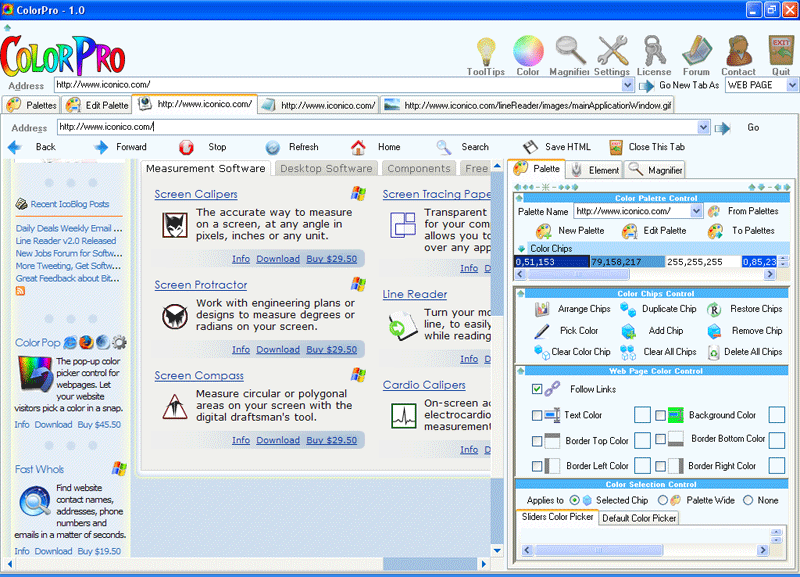 With ColorPro, you’ll be able to store collections of color chips as palettes, with the power to create new palettes or modify existing palettes to meet changing design needs. Using an intuitive user interface that loads web pages, HTML code, and graphics files in their own tabs, ColorPro gives you an easy way to precisely identify colors and acquire them for your own projects. With three options for creating your own color chips, and complete control over RGB values as well as hue, lightness, and saturation levels, ColorPro is the easiest way to integrate color management into your web development workflow.
ColorPro also excels at color management for existing websites, allowing you to set new colors for various elements of your site with just a few clicks. Now, trying out a new color scheme for your website doesn’t involve hours of manual recoding!
Read More about ColorPro
Download Now
Labels:
Iconico
Subscribe to:
Posts (Atom) 
